Log Step
Emit custom log/debug events inside a scenario as structured messages for observability and audit trails.
What it does
- Writes structured log entries into the scenario execution log at the exact point where the step runs.
- Lets you map dynamic data (for example, payload fields, step outputs, counters, flags) into the log message.
- Supports log levels (for example,
info,warning,error,debug) so you can distinguish regular trace messages from problems. - Produces a small, predictable output object that can also be used by later steps if needed.
When to use it
- When building or changing a scenario and you want visibility into what is happening at each stage.
- When you need to debug data issues: wrong values, missing fields, or unexpected branches.
- When you want to record business‑level breadcrumbs, such as “order skipped due to low stock” or “fallback API used”.
- When you want to help future maintainers understand why a path was taken without reading every condition in detail.
Typical examples:
- Log the incoming payload at the start of a scenario.
- Log decisions taken by Conditional / Switch steps (“VIP order route chosen”, “Canceled order – no fulfillment created”).
- Log the result of an external API call (status code, key parts of the response) before continuing.
- Log loop progress for Split or While Loop steps (for example, current index, total items, remaining retries).
How to configure
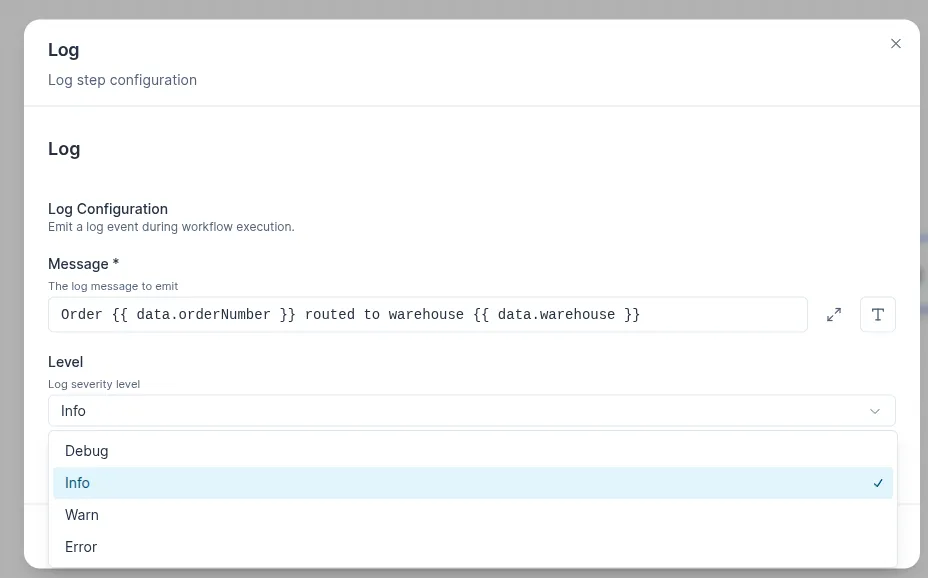
-
Message (required)
- The log message to emit.
- Supports template interpolation:
Order {{ data.orderNumber }} routed to warehouse {{ data.warehouse }}.
-
Level
- Log severity level. Options:
Debug– detailed diagnostics, typically used while building flows.Info– normal operational messages (checkpoints, milestones).Warn– something unexpected but non-fatal (fallback paths, missing optional fields).Error– something went wrong; usually paired with an Error step or retry logic.
- Log severity level. Options: