Conditional Step
If/then branching based on a condition.
What it does
- Evaluates a boolean condition and routes the flow down the true or false branch.
- Helps you keep business rules readable without duplicating steps.
When to use it
- To skip, reroute, or fail fast when inputs are missing or invalid.
- To guard expensive calls (only call an API when prerequisites are met).
- To apply different processing paths for VIP orders, countries, channels, statuses, etc.
How to configure
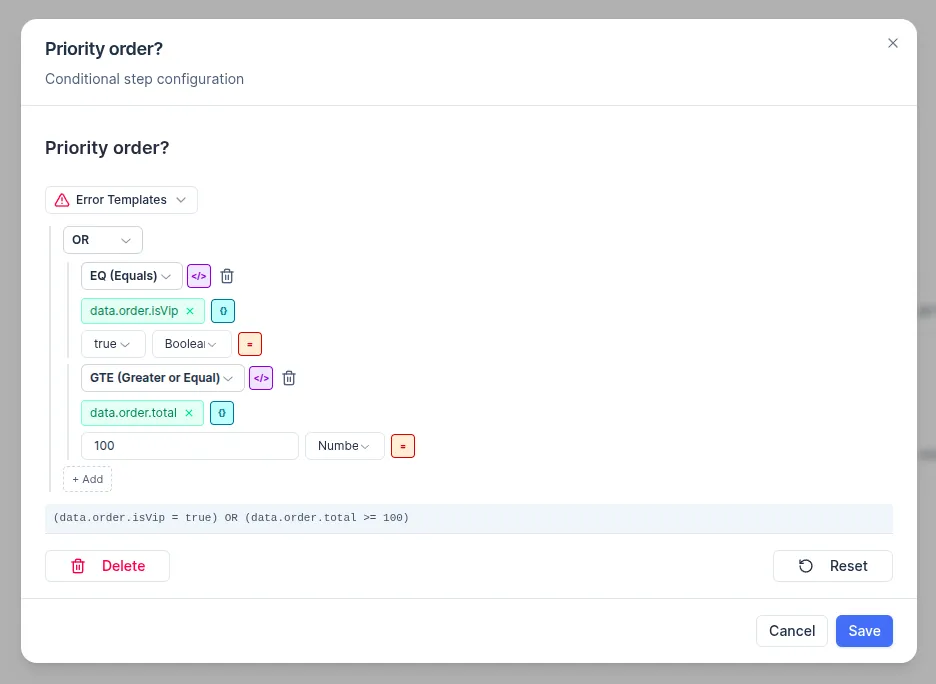
- In the UI, build the condition using:
- References to existing values (for example,
data.order.total,steps.lookup.outputs.status,variables.warehouseId) - Literal values (numbers, text, booleans)
- References to existing values (for example,
- Combine checks with AND/OR, or invert with NOT.
- Make sure your outgoing connections are labeled true and false (this is how Conditional routing is represented in the exported execution plan).
Condition operators
If you export/import scenarios as JSON, Conditional uses a condition expression with these operators:
- Logic:
AND,OR,NOT - Comparisons:
EQ,NE,GT,GTE,LT,LTE - String checks:
STARTS_WITH,ENDS_WITH,CONTAINS - Set/list checks:
IN,NOT_IN,CONTAINS - Existence/emptiness:
IS_DEFINED,IS_EMPTY,IS_NOT_EMPTY - Other:
LENGTH
Practical example (VIP / high-value order routing)
Scenario goal: if an incoming order is VIP or its total is at least $100, send it down a priority fulfillment path; otherwise follow the standard path.
Typical patterns
- Stop or reroute if required fields are missing or empty.
- Send VIP or high-value orders down a special fulfillment path.
- Only call an external API if inventory is available or a retry flag is set.