Group by Step
Group a list of items into buckets based on one or more fields.
What it does
- Takes an input list (array) and groups items into buckets based on one or more keys (for example,
customer_id,warehouse,channel). - Returns a list of groups, where each group contains:
- The group key (for example,
customer_id: 123,warehouse: DE-1). - The items in that group (a sub‑array you can loop over with
Splitor transform further).
- The group key (for example,
- Lets you build aggregation‑style flows (per‑customer, per‑order, per‑warehouse, per‑shipment) without writing code.
When to use it
- When you receive a flat list of items but need to process them per logical bucket:
- Group order lines by order ID to send each order as a separate payload.
- Group items by warehouse to create one shipment or reservation per warehouse.
- Group records by customer, channel, or country for reporting or routing.
- When downstream systems expect one call per group, not per individual item (for example, one API call per order instead of per line).
- When you want to summarize or aggregate data per group in later steps (for example, calculate total quantity per SKU per warehouse).
How to configure
-
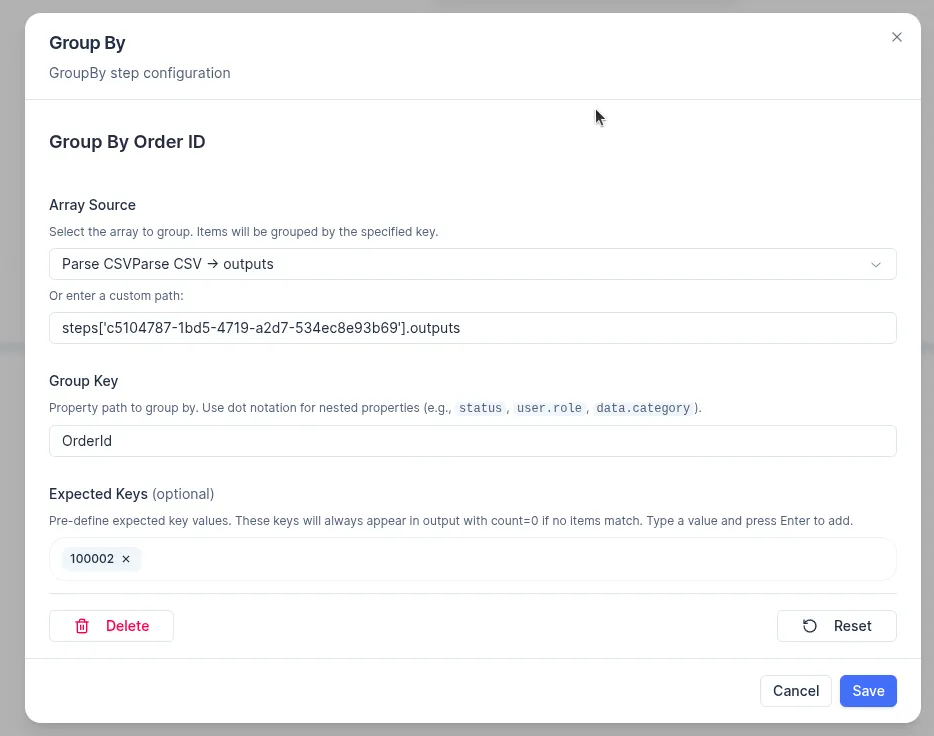
In the Group by step, select the source array:
- Incoming payload arrays (for example,
data.items,data.lines,data.orders). - Arrays from previous steps (for example,
steps.outputs).
- Incoming payload arrays (for example,
-
Define one or more grouping keys:
- Use dot notation for nested properties (for example,
user.role,data.category) - Top-level fields are referenced by name directly (for example,
OrderId,Warehouse).
- Use dot notation for nested properties (for example,
-
Configure Expected Keys (optional):
- List the item fields that will be used for grouping to work correctly (for example,
item.order_id,item.warehouse_id). - Items missing any of the expected keys can be managed in several ways:
- Redirect the items to a specific group designated for missing keys.
- Remove the items from the final output entirely.
- Initiate a validation or Error step at an earlier stage (this is the advised approach if the key is essential for the scenario).
- List the item fields that will be used for grouping to work correctly (for example,
-
Review the output shape:
- The step produces an
outputsobject with three fields:groups– an object keyed by the grouping field value; each value is an array of items belonging to that group.counts– an object keyed by the same grouping field values; each value is the number of items in that group.total_groups– the total number of distinct groups produced.
- The step produces an
Typical patterns
- Per‑order grouping:
- Input: list of line items for multiple orders.
- Group by:
order_id. - Then: use
Spliton the output groups to send or sync each order separately.
- Per‑warehouse grouping:
- Input: inventory changes across multiple warehouses.
- Group by:
warehouse_id. - Then: send one payload per warehouse to WMS or ERP.
- Per‑customer or per‑channel grouping:
- Input: orders or invoices from multiple channels/customers.
- Group by:
customer_id,channel. - Then: route groups to different target systems or apply different business rules.